
How to Use Video Ads for Retargeting on YouTube & Facebook
- Sammy
- Oct 30, 2025
- 6 min read


Why Retargeting Deserves Your Attention
In the fast-paced world of digital marketing, not everyone converts on their first visit—and that’s perfectly normal. But letting those warm prospects slip away isn’t.
That’s where video retargeting steps in. It’s your brand’s second chance to re-engage potential customers who already interacted with your business. Whether they watched your video, visited your website, or added an item to their cart—retargeting video ads on YouTube and Facebook allow you to reconnect with them in a visually engaging and persuasive way.
In this comprehensive guide, we’ll break down how to use video ads for retargeting on YouTube & Facebook effectively covering setup, creative best practices, audience segmentation, optimization tips, and real-world examples.
Understanding Retargeting: The Digital Reminder That Works
What Is Retargeting?
Retargeting (also known as remarketing) is a strategy that targets users who have already shown interest in your brand. These users may have visited your website, watched your video, or engaged with your content—but didn’t take the desired action.
Why Video Ads Make Retargeting More Powerful
While display and static ads remind people you exist, video ads persuade them to act.
Here’s why:
Emotion-driven storytelling: Video lets you combine visuals, sound, and narrative to build trust.
Higher recall: Studies show viewers retain 95% of a video’s message compared to 10% for text.
Personalization: Tailored video messages connect better with segmented audiences.
Engagement-first format: Platforms like YouTube and Facebook prioritize video in their algorithms.
Simply put—if traditional retargeting says, “Hey, remember us?”, video retargeting says, “Here’s why you should come back.”
🌐 Why Choose YouTube and Facebook for Video Retargeting?
Both platforms dominate the digital video landscape—but they serve distinct purposes in the buyer’s journey.
YouTube: The Intent Platform
Users actively search for information, tutorials, and product reviews.
Your brand appears when interest is already high.
Ideal for reinforcing credibility and showcasing expertise.
Facebook (and Instagram): The Attention Platform
Users scroll through content casually, open to discovery.
Advanced behavioral targeting allows hyper-personalized messaging.
Perfect for visual storytelling and emotional engagement.
The Power of Using Both
A combined strategy ensures you reach audiences at multiple touchpoints:
YouTube captures intent-driven viewers actively researching solutions.
Facebook nurtures awareness and familiarity among social audiences.
When orchestrated together, they create a powerful retargeting loop that maximizes conversions and minimizes ad fatigue.

Step-by-Step: How to Use Video Ads for Retargeting on YouTube & Facebook
Step 1: Set Up Tracking — The Foundation of Every Retargeting Campaign
Before you can retarget, you must first track. Accurate data ensures your ads reach the right people.
On Facebook:
Go to Meta Events Manager → Set up Meta Pixel.
Install the Pixel code on your website.
Verify using the Meta Pixel Helper browser extension.
Track key actions like:
Page Views
Add to Cart
Initiate Checkout
Purchases
On YouTube (via Google Ads):
In Google Ads, navigate to Tools & Settings → Audience Manager.
Install the global site tag and remarketing tag on your site.
Connect your YouTube channel to your Google Ads account.
Build custom audiences based on:
Website visitors
YouTube video viewers
App users or subscribers
💡 Pro Tip: Double-check that both tracking codes are firing properly before launching your campaign.
Step 2: Segment Your Audiences Like a Pro
Segmentation allows you to tailor messaging based on user behavior.
Recommended Audience Segments:
Website Visitors – Users who visited but didn’t purchase.
Cart Abandoners – Those who initiated checkout but didn’t complete it.
Video Viewers – People who watched at least 50–75% of your video.
Engaged Social Users – Those who liked, commented, or shared.
Existing Customers – Ideal for upsells and loyalty campaigns.
🎯 Goal: Personalize the message to reflect the user’s journey stage. A one-size-fits-all approach rarely converts.
Step 3: Create Compelling Video Ad Content
The creative is where campaigns succeed or fail. Retargeted audiences already know your brand—now you need to persuade them to take action.
The Anatomy of a High-Performing Retargeting Video:
Hook (First 5 Seconds): Capture attention instantly. Address the viewer directly:
“Still thinking about that fitness plan, you checked out?”
Problem Recognition: Remind viewers of their pain point or need.
Solution Presentation: Show your product or service solving that problem visually.
Social Proof: Incorporate testimonials, stats, or awards to build trust.
Call to Action (CTA): End with clarity—“Shop Now,” “Book a Demo,” or “Claim Offer.”
Creative Guidelines:
Keep videos 15–30 seconds long.
Use subtitles for silent autoplay.
Add your logo and brand color within the first few seconds.
Design vertical (9:16) versions for Facebook/Instagram and horizontal (16:9) for YouTube.
Step 4: Launching Retargeting on YouTube
Steps to Create a YouTube Retargeting Campaign:
In Google Ads, click New Campaign → Video → Drive Conversions.
Under Audiences, select your retargeting list.
Choose your preferred ad format:
Skippable in-stream ads (5+ seconds, strong storytelling)
Bumper ads (6-second brand reminders)
In-feed ads (show alongside relevant content)
Set your budget and bidding strategy (start small; optimize later).
Launch and track key metrics:
View-through rate (VTR)
Cost per view (CPV)
Conversion rate
💬 Example: A SaaS company runs a 20-second retargeting video titled “Still using spreadsheets? There’s a better way.” The ad links to a 7-day trial. Within a week, trial signups rise by 42%.
Step 5: Launching Retargeting on Facebook and Instagram
Steps to Create a Facebook Video Retargeting Campaign:
Go to Ads Manager → Create → Campaign Objective: Conversions.
Build a Custom Audience:
Website visitors (via Meta Pixel)
Video engagement (e.g., 75%+ viewed)
Upload your video creative and select placements:
Facebook Feed
Instagram Reels or Stories
Audience Network (optional)
Define your budget and schedule.
Monitor KPIs like:
CTR (Click-Through Rate)
ROAS (Return on Ad Spend)
Cost per Result
💬 Example: A jewelry brand retargets Instagram users with a short video saying,
“You admired this bracelet… but it’s waiting for you.”Result: 3.5x increase in checkout completions and 50% higher ROI compared to static retargeting ads.

Optimization Techniques for High-Performance Retargeting Campaigns
1. Test, Measure, Refine
Constant testing keeps campaigns sharp.
Test different video lengths and hooks.
Compare CTAs (“Shop Now” vs. “Discover More”).
Adjust audience duration (7 days vs. 30 days).
2. Frequency Capping
Repetition helps recall—but overexposure causes fatigue.
Limit impressions to 2–3 per day per user.
Rotate creatives every 3–4 weeks.
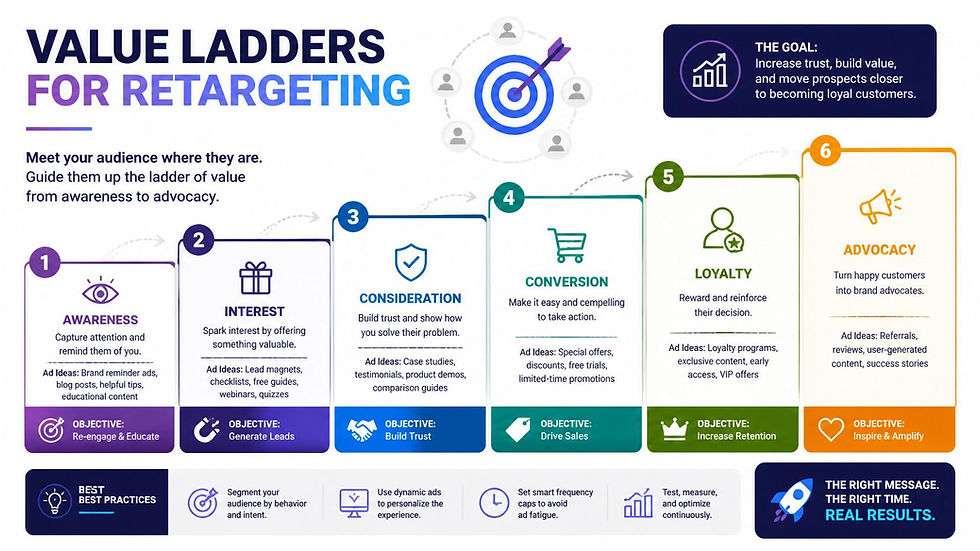
3. Sequential Retargeting
Build narrative progression:
Ad 1: Brand awareness
Ad 2: Product demo
Ad 3: Offer or urgency
This storytelling approach keeps audiences engaged without feeling repetitive.
4. Analyze Meaningful Metrics
Beyond vanity metrics (views, likes), focus on:
Conversion Rate
CPA (Cost Per Acquisition)
Engaged View Rate
Frequency vs. ROI correlation
Real-World Example: From Awareness to Action
Client: Boutique Travel Agency Challenge: Visitors browsed tour packages but failed to book. Solution:
Ran a YouTube retargeting ad showing a 15-second clip of scenic drone shots.
Paired it with a Facebook ad featuring customer testimonials. Result:
5.2x increase in conversion rate.
60% drop in cost per lead.
By combining storytelling with sequential retargeting, the agency turned passive interest into active bookings.

Common Mistakes to Avoid
Using Generic Messaging – Tailor content to specific audience actions.
Skipping Tracking Verification – No data = no retargeting.
Neglecting Mobile Optimization – 80%+ of video views happen on mobile.
Over-Frequency – Leads to ad fatigue and negative perception.
Ignoring Exclusion Lists – Always exclude converted users.
Recap: Key Takeaways on How to Use Video Ads for Retargeting on YouTube & Facebook
Stage | Action | Key Goal |
Setup | Install tracking tags | Capture visitor data |
Segmentation | Group by behavior | Personalize messages |
Creation | Build short, clear videos | Engage and convert |
Launch | Use YouTube & Facebook Ads | Reach warm audiences |
Optimization | Test and refine | Maximize ROI |
Win Back Attention with Smart Video Retargeting
In today’s attention-driven digital ecosystem, video retargeting is no longer optional—it’s essential. It bridges the gap between initial curiosity and final conversion by delivering messages that are relevant, timely, and emotionally resonant.
When you understand how to use video ads for retargeting on YouTube & Facebook, you’re not just advertising—you’re nurturing relationships.
Every skipped cart, half-watched video, and “maybe later” click becomes an opportunity to re-engage, re-educate, and convert.
Call to Action
Ready to elevate your digital strategy with high-converting video retargeting campaigns? Visit www.digitaldreamworksstudio.com or message our team to schedule a free consultation.
We’ll help you create data-backed, creative-first video ads that re-engage your audience and boost your bottom line.
FAQ: How to Use Video Ads for Retargeting on YouTube & Facebook
Q1. What’s the ideal length for a retargeting video ad? Keep it between 15–30 seconds—short, engaging, and to the point.
Q2. Which performs better—YouTube or Facebook? Both complement each other. YouTube drives intent; Facebook drives familiarity. The best strategy uses both.
Q3. How much budget should I allocate for retargeting? Start with $10–20 per day per platform, analyze ROI, and scale accordingly.
Q4. Can I retarget users who watched my videos but never visited my website? Yes. Both platforms allow engagement-based audiences (e.g., people who watched 50%+ of your video).
Q5. How do I know if my retargeting campaign is working? Monitor ROAS, Conversion Rate, and Frequency. If you’re converting at a lower cost than your cold campaigns, you’re winning.


Comments